

A business website rarely fails at a convenient time. A form stops delivering messages during a busy week. A domain renewal notice goes to a former employee. A software update breaks a page. A storm interrupts power or internet access just when customers need accurate hours and instructions.
Routine website maintenance cannot prevent a hurricane, a utility outage, or every technical failure. It can make the website easier to update, restore, and trust when normal operations are disrupted.
Florida’s Division of Emergency Management identifies June 1 through November 30 as hurricane season. Southwest Florida businesses should prepare their broader operations according to official emergency guidance. This checklist focuses on one smaller part of that work: keeping the business’s public website and essential digital access organized.
First, define who owns website continuity
Assign a primary owner and a backup person for the website. Both should know:
- Where the domain is registered
- Where the site is hosted
- How to access the content management system
- Who controls DNS and security services
- Where backups are stored
- How forms and ecommerce notifications are routed
- Who can publish an emergency notice
- How to contact the developer or support provider
Do not keep the only password, recovery method, or billing notice in one employee’s inbox. Use a reputable password manager, enable multifactor authentication where available, and keep recovery information current.
The monthly website-maintenance checklist
Test every important customer action
Submit contact, estimate, booking, newsletter, login, and checkout forms as a customer would. Confirm the success message appears and the notification reaches the correct person. Test on both a phone and a computer.
A form that looks functional but sends inquiries to an abandoned address can fail quietly for months.
Review business information
Check phone numbers, email addresses, hours, service areas, staff information, pricing language, policies, and calls to action. Update seasonal details and remove expired promotions.
Then compare the website with other important customer-facing systems, including the Google Business Profile. Consistency helps customers find accurate information when conditions change.
Check backups and restore points
Confirm that backups are completing successfully and are stored somewhere separate from the live website. A backup on the same compromised or failed system may not be enough.
Record what each backup contains: site files, database, uploaded media, configuration, customer data, and third-party settings. Retention should match the business’s needs and legal responsibilities.
Review updates and security notices
Apply supported software, theme, plugin, framework, and dependency updates through a controlled process. Back up first, review release notes when risk is material, and test important pages afterward.
Remove unused accounts and integrations. Confirm administrators still need their access and that former employees or vendors have been removed.
Check uptime, HTTPS, and domain status
Confirm the website loads securely without certificate warnings. Review domain and hosting renewal dates, payment methods, and administrative contacts. Keep renewals under business-controlled accounts rather than a vendor’s personal account.
Review speed and mobile usability
Open the site on a typical mobile connection. Look for oversized images, shifting layouts, delayed buttons, intrusive popups, and text that is difficult to read. Performance is not a once-and-finished project; content and third-party tools can gradually slow a site.
Scan for broken links and missing pages
Check navigation, calls to action, downloadable files, important internal links, and frequently visited landing pages. If a useful URL changes, create an appropriate redirect instead of sending customers to an error page.
The quarterly continuity review
Confirm account ownership
Build a small access register containing the service, business owner, backup owner, renewal date, recovery method, and support contact. Never put passwords directly in a general spreadsheet.
Verify that the business—not only a contractor—controls the domain, hosting relationship, analytics, search tools, and essential integrations. Our guide to choosing a website platform explains why practical ownership matters long before an emergency.
Test a real restore
“Backup successful” is not the same as “recovery proven.” Periodically restore the site or a representative copy in a safe environment. Record how long the process takes, what is missing, and who can complete it.
Review third-party dependencies
List the services the website depends on: forms, scheduling, payment processing, email, maps, analytics, fonts, customer chat, and automation. Decide what customers will see if any one service becomes unavailable.
Prepare emergency website content
Draft a plain, reusable notice with fields for:
- Current operating status
- Temporary hours or closure
- Service interruptions
- Alternate contact method
- Safety or scheduling instructions
- Date and time of the latest update
- Link to the appropriate official authority
Keep the language factual and brief. Do not copy unverified storm information or imply that the business is an emergency authority. Link customers to official local, state, or federal sources when safety information is involved.
Decide what can be simplified
During a disruption, the business may need a lightweight version of the most important information: status, phone number, contact form, customer instructions, and location details. Discuss with the website provider whether a static status page or alternate publishing path is appropriate.
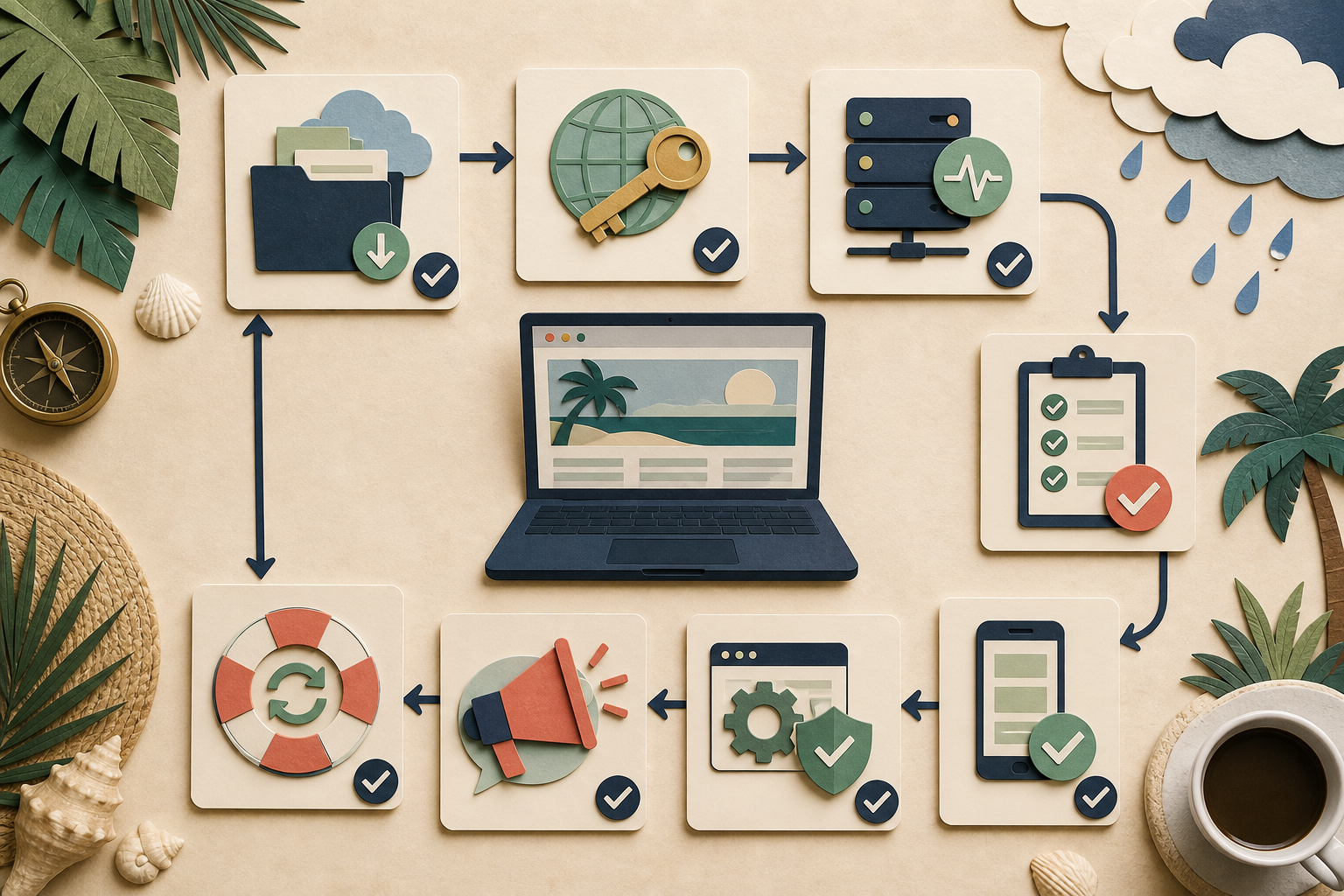
A continuity plan is a loop: protect access, monitor the site, test customer actions, prepare updates, and prove that recovery works.
Before hurricane season
Complete this focused review before June 1 each year:
- Confirm all administrative and recovery contacts.
- Renew or verify automatic renewal for the domain, hosting, and security services.
- Create and test an independent backup.
- Test the restoration procedure.
- Test every lead and commerce path.
- Update the emergency notice template.
- Confirm who can publish from outside the normal workplace.
- Store vendor and account contacts in an accessible continuity plan.
- Review privacy and security requirements for any copied customer data.
- Coordinate website procedures with the company’s broader emergency plan.
When a storm may affect operations
Follow official emergency guidance first. When it is safe and appropriate to manage business communications:
- Publish only confirmed operating information.
- Add the update time so customers know whether the notice is current.
- Keep the most important status visible without requiring a download.
- Update hours and customer instructions across other essential profiles.
- Pause campaigns or automated messages that conflict with current operations.
- Preserve inquiries and transactions for follow-up.
- Avoid large, risky website changes immediately before the event.
After operations resume
Remove or archive temporary notices when they are no longer accurate. Test forms, payments, scheduling, analytics, and integrations. Review uptime and security logs for unexpected activity. Confirm backups resumed and capture lessons while the experience is still recent.
If the website could not be updated or restored as expected, turn that failure into a specific improvement: another account owner, a different backup location, better documentation, or a simpler emergency-publishing method.
Frequently asked questions
How often should a small-business website be maintained?
Customer actions, business details, backups, security updates, uptime, and renewal status deserve at least a monthly review. More active or transactional sites may require daily monitoring and more frequent updates.
Is an automatic backup enough?
Only if it completes, contains the required data, remains available when the live system fails, and can be restored. Test recovery instead of trusting a green status icon alone.
Should emergency information live only on social media?
No single channel is guaranteed to be available or seen. The business website provides a controlled source customers can bookmark, while other channels can point back to the current notice.
Does a maintenance plan replace business-continuity planning?
No. Website maintenance supports communication and recovery, but broader continuity planning includes people, facilities, finances, vendors, records, safety, and operations. Follow guidance from appropriate authorities and qualified advisors.
Make maintenance an operating habit
A dependable website is not one that never changes. It is one whose ownership is clear, customer paths are tested, information stays accurate, and recovery has been practiced.
Local Legacy Consulting’s Legacy Care supports ongoing website upkeep, while our Southwest Florida services can help align the website with the way the business actually operates.