

A visitor reaches your website with a quiet list of questions: Is this business real? Does it handle work like mine? Will someone answer? What happens after I submit this form? Can I verify any of these claims?
Website trust signals are the evidence that helps a person answer those questions. They are not decorative badges or vague promises. For a small business, the strongest signals usually connect three things: a clear claim, proof a visitor can evaluate, and a safe next step.
That distinction matters. “Trusted local experts” is a claim. A named owner, current project photos, a specific service area, an authentic customer review, and a working local phone number are evidence. A short form that explains what happens next is a safe action.
This guide shows which trust signals deserve space on your website, where to place them, and how to audit them without inventing credentials or crowding every page with logos.
What are website trust signals?
A website trust signal is any detail that helps a visitor judge whether a business, offer, or next step is credible. Some signals are visible, such as an owner biography, review, project example, price explanation, or return policy. Others are experiential: the page loads reliably, works on a phone, labels its form clearly, uses a secure connection, and does not surprise the visitor with a different offer at checkout.
Social proof is one kind of trust signal, not the whole category. A site can display excellent reviews and still create doubt if the business identity is unclear, the service description is generic, the contact information conflicts with its profile, or the form requests information it does not need.
Google’s guidance for people-first content asks whether a page provides clear sourcing, evidence of expertise, and background about the author or site. That is useful editorial guidance, but it is not a recipe for a guaranteed ranking. Trust signals should first help the customer make a sound decision. Search visibility is a possible benefit of building a genuinely useful, accountable website—not a reason to manufacture proof.
The eight trust signals small-business websites need most
The right order depends on the decision. A roofer, therapist, restaurant, consultant, and online store will not use identical proof. Start with the uncertainty a customer must resolve before taking the next step.
1. A clear business identity
Show who is responsible for the work. A useful About page names the owner or team, explains the business in concrete terms, and gives a credible reason it exists. Use current, real photography when available. If privacy or safety makes names or faces inappropriate, explain the organization, qualifications, and accountability another truthful way.
The footer and contact page should reinforce the same identity with the business name, primary contact method, service area or customer-facing location, and links to relevant policies. Do not publish a home address or pretend a mailbox is a staffed office. Accuracy is more trustworthy than unnecessary detail.
2. Specific service and scope information
“Full-service solutions” gives a visitor almost nothing to evaluate. A credible service page explains:
- Who the service is for
- What is included and excluded
- How the process normally works
- What the customer may need to provide
- What affects timing or price
- What the next step will accomplish
This is especially important for local service businesses. A page can state the real territory served and the types of jobs accepted without repeating a city name in every sentence. If you serve several markets, create location pages only when they add useful local detail. Local Legacy Consulting’s Southwest Florida service-area overview shows how one regional page can connect distinct locations without turning them into thin doorway content.
3. Proof attached to the claim it supports
Place proof near the decision, not only on a distant testimonials page. A visitor comparing a redesign service should see a relevant before-and-after example. Someone evaluating maintenance should see what is monitored or included. A buyer considering a custom product should see material, sizing, shipping, and return details.
Strong proof may include:
- A project example with the challenge, work performed, and observable outcome
- Original photos of the team, location, process, product, or completed work
- A case study with enough context to understand what changed
- A license, certification, award, or membership that is current and verifiable
- A review that describes the service received rather than generic praise
Never invent client names, crop away meaningful context, or imply that an award or credential applies to work it does not cover.
4. Authentic reviews and responsible testimonials
Use genuine feedback and preserve its meaning. Include a name or other identifying detail only when you have permission. When practical, link to the original review platform or explain where the review came from. A balanced collection of specific reviews is more useful than a wall of anonymous superlatives.
The Federal Trade Commission’s Consumer Reviews and Testimonials Rule prohibits several deceptive practices, including fake or false reviews and buying reviews conditioned on a particular positive or negative sentiment. The FTC also provides disclosure guidance when an endorser has a material connection to a business. Treat review integrity as a business practice, not a design flourish.
5. Contact details and response expectations
A phone number or email address is useful. A clear response expectation is better. Tell the visitor whether the form requests a quote, schedules a consultation, joins a waitlist, or starts a support request. If inquiries are answered during business hours, say so. If the first conversation is exploratory and not a commitment, make that clear.
Then test the path. Confirm the phone link works on mobile, the form reaches the right inbox, the confirmation message appears, and someone owns the response. A polished contact page that delivers inquiries to an abandoned email account is the opposite of a trust signal.
6. Plain-language policies and price context
Customers do not need every business to publish a fixed price. They do need enough information to understand the commitment. Depending on the offer, that may mean a starting price, typical scope, estimate process, deposit terms, cancellation rules, shipping timing, return policy, warranty limitations, financing terms, or what triggers an additional charge.
Put the relevant policy before the point of commitment. Avoid hiding essential conditions in tiny footer text or introducing them after a visitor has invested time in a long form. For website projects, our guide to questions to ask before choosing a website platform covers ownership, access, recurring costs, and portability—the trust details that often matter after launch.
7. A secure, respectful data experience
HTTPS is baseline protection for information in transit; it is not proof that every claim on the website is true. Use it across the entire site, keep software and integrations maintained, and make forms ask only for information needed at that stage.
Explain why sensitive information is requested and how it will be used. Do not ask for payment details, government identifiers, medical information, or other high-risk data through a general inquiry form. The FTC advises businesses to collect only information they legitimately need, keep it only as long as necessary, protect it, and dispose of it securely.
8. Accessible, stable, low-friction usability
Trust is also an experience. Text should be readable. Links and buttons should be identifiable. Forms need labels, helpful errors, and keyboard access. Pages should work on common mobile screens. Important content should not jump while loading or disappear behind intrusive pop-ups.
Accessibility is not a badge to add after the build. It is an ongoing practice that makes a website usable by more people. W3C’s Web Accessibility Initiative notes that accessibility can improve user experience, strengthen brand inclusion, extend reach, and reduce risk; the right business case depends on the organization.
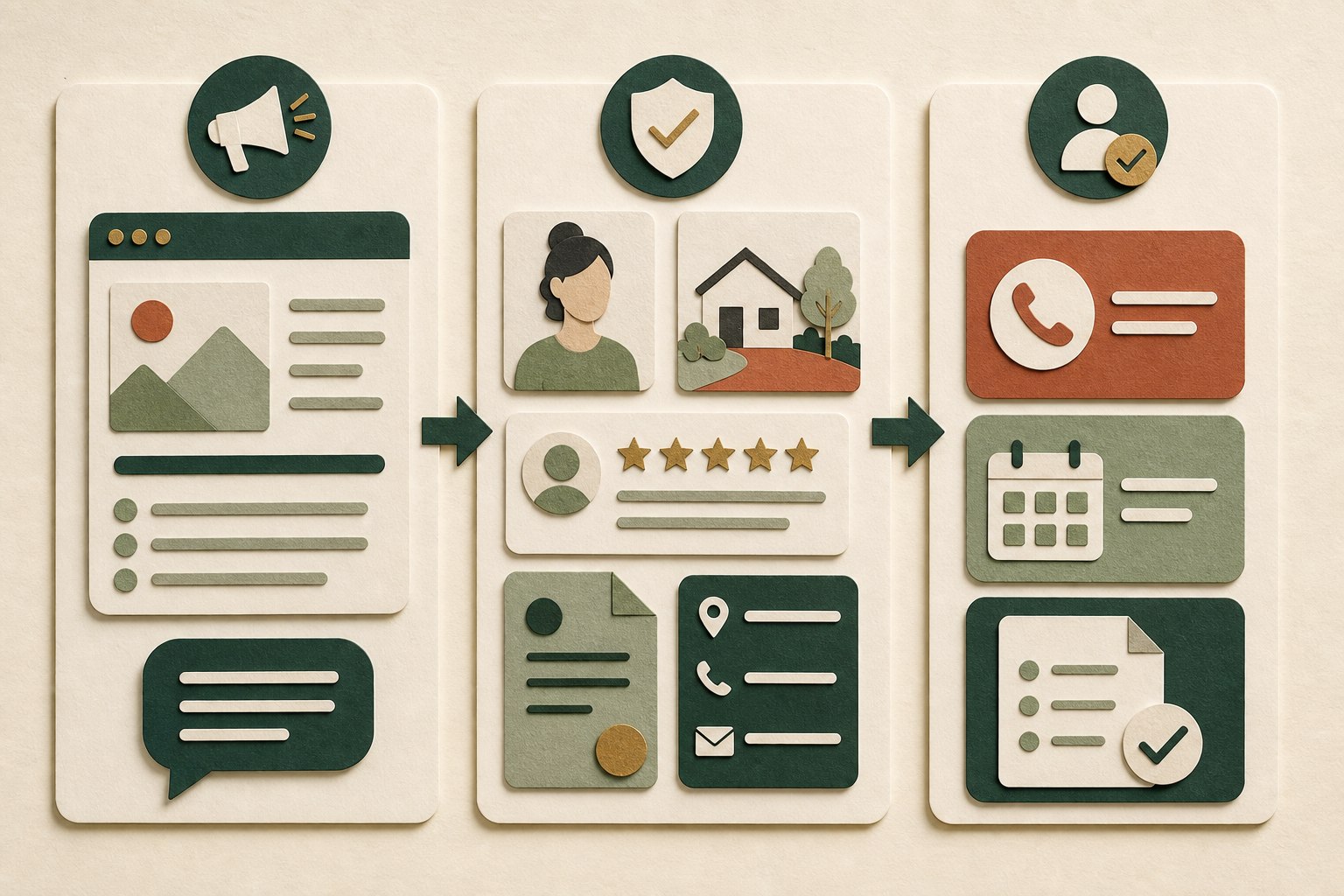
A useful trust signal connects what the business says, evidence a customer can evaluate, and a clear action with low uncertainty.
Where trust signals belong on the website
Do not place every signal everywhere. Match evidence to the question a page creates.
| Page | Main visitor question | Useful trust signals |
|---|---|---|
| Home | “Am I in the right place?” | Clear offer, audience, service area, real imagery, selected proof, primary next step |
| Service | “Can this business handle my need?” | Scope, process, relevant project, qualifications, price context, service-specific reviews |
| About | “Who is behind this?” | Named people, real story, experience, values shown through decisions, direct contact path |
| Contact | “What happens if I reach out?” | Working contact methods, response expectation, form purpose, privacy context, alternatives |
| Ecommerce or booking | “Is this transaction safe and predictable?” | Full price, availability, delivery or appointment terms, cancellation/return policy, secure checkout |
| Article | “Why should I trust this guidance?” | Author or publisher, publication/update date, original insight, sources, relevant service context |
The test is simple: Does this evidence reduce the specific risk created by this decision? A generic five-star graphic does little beside a complex service proposal. A relevant case example, transparent process, and named point of contact may do much more.
A 20-minute website trust checklist
Open the site on your phone and complete this audit as if you have never heard of the business.
- Five-second identity check: Can you tell what the business does, who it serves, and where or how it serves them without opening the menu?
- Claim-to-proof check: Circle the three strongest claims on the page. Is there specific evidence near each one?
- Reality check: Can you find a real person, place, process, product, or completed project—not only stock imagery?
- Consistency check: Do the business name, phone, hours, service area, and offer match the Google Business Profile and major social profiles?
- Contact check: Tap every phone, email, booking, and form action. Does each work, and does the confirmation explain what happens next?
- Review check: Are testimonials authentic, permissioned, specific, and presented without altering their meaning or hiding material connections?
- Policy check: Can a customer understand important price, cancellation, return, warranty, privacy, or data-use terms before committing?
- Mobile and accessibility check: Can you zoom, read, navigate, and submit with clear labels and visible focus? Are pop-ups blocking the task?
- Freshness check: Remove expired offers, old staff details, broken certifications, inaccurate hours, and project examples that no longer represent the work.
- Ownership check: Does the business control the domain, hosting, analytics, form destinations, and important accounts? The website ownership guide can help document access.
Fix broken actions and inaccurate facts first. Then strengthen proof near the highest-value service or product. A redesign can help when the site’s structure prevents those improvements, but many businesses can make meaningful progress by clarifying existing pages. Our guide to signs a small-business website needs a redesign separates repairable content issues from deeper structural problems. If the website needs a coordinated content, design, and technical update, The Legacy Refresh is Local Legacy Consulting’s service for improving an established site without discarding what still works.
Website trust signals that often backfire
- Unverifiable badges. A shield icon, “best of” graphic, or association logo should not appear unless it represents a real, current credential and follows the issuer’s rules.
- Anonymous praise. Initials and generic compliments offer little context. Use them only when privacy is necessary and permission is clear.
- Stock photos presented as proof. Stock imagery can support mood, but it should not imply that pictured people, locations, or projects belong to the business.
- Unsupported numbers. “Thousands served,” “number one,” and percentage improvements need a defensible source and scope.
- Manufactured urgency. Perpetual countdowns, fake scarcity, and surprise pop-ups undermine the confidence the page is trying to build.
- Security theater. A padlock graphic is not a security program. Maintain the site, minimize collected data, use appropriate providers, and keep a response plan.
- Perfect consistency at the expense of truth. Do not repeat an outdated address, service, or credential merely because it appears elsewhere. Correct the source and align every channel.
Frequently asked questions
What are the best website trust signals for a small business?
Start with a clear business identity, specific service information, real work examples, authentic reviews, accurate contact details, understandable policies, secure forms, and usable mobile pages. The best signal is the one that answers the customer’s next reasonable doubt.
Do trust badges increase conversions?
No badge guarantees more sales. A current, verifiable certification or payment mark can reduce uncertainty when it is relevant to the action. An unfamiliar, expired, or decorative badge can add clutter or create suspicion. Test the full customer journey instead of assuming the graphic caused a change.
How many testimonials should a website have?
There is no universal number. Use enough relevant, authentic feedback to represent the work without overwhelming the page. A few specific testimonials near the services they describe are usually more helpful than a large undifferentiated slider. Keep collecting honest feedback over time and follow applicable review and disclosure rules.
Does HTTPS make a website trustworthy?
HTTPS helps protect the connection between the visitor and the website. It does not verify that the business is competent, honest, or suitable. Treat secure delivery as a baseline, then add truthful identity, evidence, policies, and customer support.
Can a new business build trust without many reviews?
Yes. Do not fabricate social proof. Show the owner, explain the process, publish accurate policies, document sample or early work honestly, make contact easy, and set clear expectations. Trust can begin with accountability and useful detail while a genuine review history develops.
Build proof before adding persuasion
A trustworthy small-business website does not try to eliminate every possible objection with louder copy. It makes the business easier to verify. The identity is clear, the offer is specific, evidence sits beside the claim it supports, policies appear before commitment, and the next step behaves as promised.
Choose one high-value page this week. Replace one vague claim with evidence, test the main action on a phone, and correct one detail that no longer matches the business. That is a stronger starting point than adding another badge.
Turn your real strengths into a website customers can verify.
Local Legacy Consulting helps small businesses organize their offer, proof, customer journey, and ownership into a practical website built to last.
Discuss your website →